Hawaii - Minor (22.17)
Release Summary
Kaptio is proud to announce this minor release for Hawaii. This release is intended to address issues with previous releases.
See Minor Changes and Bug Fixes for more information.
Minor Changes
Feature: Adjustments
Expose Adjustment mechanism as an API (ST-1785)
Overview
A new callable service AdjustmentsApi has been introduced to expose Adjustment functionality for external systems. This API allows programmatic creation, deletion, and discovery of adjustments via ServiceCall.execute().
Available Methods
1. saveAdjustmentChanges
Creates new adjustments and/or deletes existing adjustment itinerary items.
Parameters:
Parameter |
Type |
Description |
|
Id |
Target itinerary |
|
List |
Adjustments to create |
|
List<Id> |
Adjustment item IDs to delete |
Example:
Map<String, Object> arguments = new Map<String, Object>{
    'itineraryId' => 'a24Q1000006dVV8IAM',
    'newAdjustments' => new List<Map<String, Object>>{
        new Map<String, Object>{
            'serviceId' => 'a1eQ1000004BiPvIAK',
            'priceCategoryId' => 'a35Q1000004Jhl8IAC',
            'passengerId' => 'a2oQ100000184VjIAI',
            'value' => 1000,
            'impactsCommission' => false
        }
    },
    'deletedAdjustmentIds' => new List<Id>()
};

ServiceCall.execute('AdjustmentsApi.saveAdjustmentChanges', arguments);
2. searchAdjustments
Searches for available adjustments and retrieves their pre-defined prices from KTAPI.
Parameters:
| Parameter | Type | Description |
|---|---|---|
|
String |
Search filter (empty string returns all) |
|
Id |
Channel for pricing |
|
String |
Currency code (e.g., 'USD') |
|
Date/String |
Date for price calculation |
Example:
Map<String, Object> searchArgs = new Map<String, Object>{
    'searchTerm' => '',
    'channelId' => 'a0nQ1000002LzaUIAS',
    'currencyCode' => 'USD',
    'itineraryStartDate' => '2026-02-02'
};

Map<String, Object> searchResult = (Map<String, Object>) ServiceCall.execute('AdjustmentsApi.searchAdjustments', searchArgs);
List<Object> adjustments = (List<Object>) searchResult.get('adjustments');
Response:
{
  "action": "searchAdjustments",
  "status": "success",
  "adjustments": [
    {
      "serviceId": "a1eQ1000004BiPvIAK",
      "priceCategoryId": "a35Q1000004Jhl8IAC",
      "name": "Discount - Standard",
      "value": -100.00,
      "enableManualAdjustmentPricing": false,
      "impactsCommission": true
    }
  ]
}
Note: Using an empty
searchTerm('') returns all available adjustments for the specified channel, currency, and date.
Feature: Booking Overview
Show Adjustments in Booking Wizard Price Summary (ST-933)
The Booking Wizard Summary has been enhanced to display adjustments per room and per passenger consistently, aligned with the logic used for Options and the Booking Overview. Adjustments are now conditionally shown or hidden based on passenger data, collapsed into a single row when all passengers share the same value, and expanded into itemised passenger rows when values differ. Zero-value passenger adjustments are hidden, room-level totals are calculated correctly, and all pricing dynamically updates after recalculation or passenger swaps. This ensures that totals and breakdowns in the summary always match what is shown in the Booking Overview.
Feature: Package Search
Filter Panel - Categories - Change AND to OR logic. (CEE-574)
Added hidden Categories Search Operator configuration, enabling users to be able to search by several categories and quickly present a relevant range of options to guests who are flexible
A new hidden configuration setting ‘Categories Search Operator’ has been added for ‘Package Search’ Lightning component:
-
Allowed values:
AND,OR -
Default:
AND -
When default value
ANDis set, behavior remains unchanged, results include only packages matching all selected categories -
When
ORvalue is set, results include packages matching at least one selected category
Availability Results - Restore Ability to Create Itinerary without Booking Wizard (CEE-575)
-
Restore the ability to create an itinerary from the PS Availability Results tab without the Booking Wizard (BW).
-
Use existing isAddOptionsDefault config (no new config):
-
true → Add Options (opens BW)
-
false → Create Itinerary (legacy BookingFactory, no new Booking API)
-
When “Create Itinerary” is shown: dispatch addtoitinerary event with the same DTO contract/params as LwcPackageSearchResultsRowItem.
-
Remove Secondary Action (SA) dropdown/menu UI and all related JS/HTML logic from LwcPackageSearchAvailabilityRowExpanded.
-
After the change, there is only one primary button (Add Options / Create Itinerary / Join Waitlist, depending on scenario).
Filter Panel - Need to concatenate Package Code and Name together for Packages Selection multiselect (CEE-577)
New Feature: Display Package Codes in Package Name Selection List
Overview:
Added a configuration setting to display package codes alongside package names in the Package Name selection list, enabling users to search and select packages by code prefixes or names in a single unified interface.
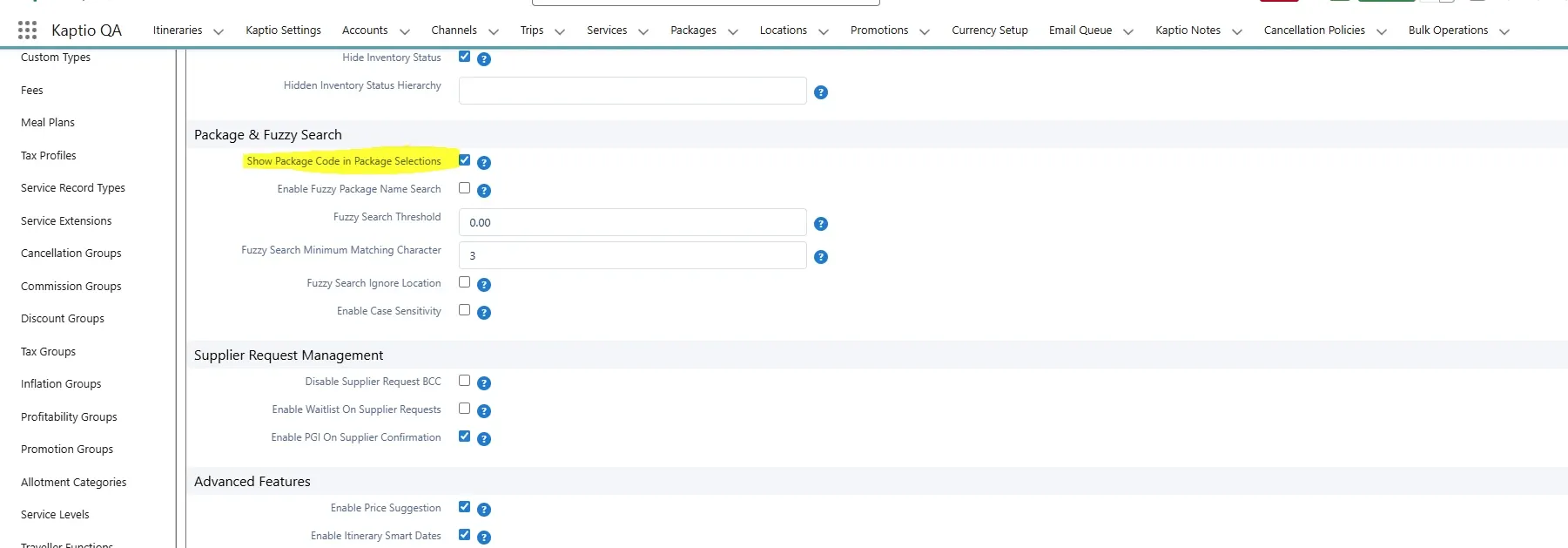
A new hidden setting "Show Package Code in Package Selections" has been added to Kaptio Settings:
-
Type: Boolean checkbox
-
Default:
false(maintains current behavior for existing organizations) -
When enabled: Package codes are displayed and searchable in the Package Name selection list
-
When disabled: Current behavior remains unchanged (only package names shown)
-
Under Trip & Itinerary Settings
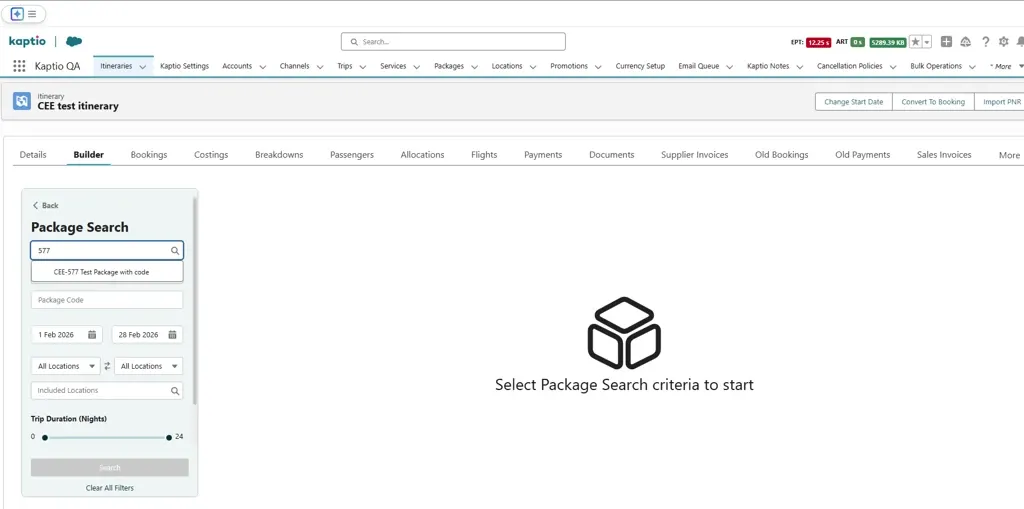
When enabled:
-
Package Code is visible in the Package Search
New Feature: Auto-Default Start Date to Next Available Departure Month in Package Search (CEE-578)
Overview:
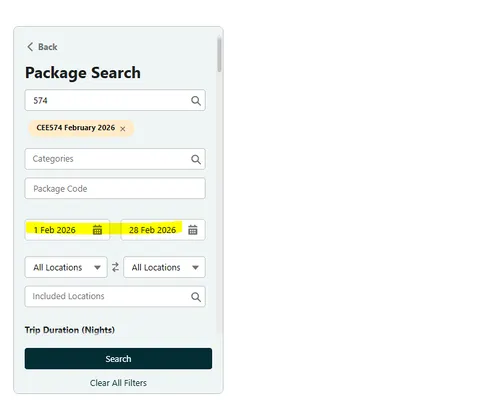
Package Search now automatically sets the Start Date to the month containing the next available future departure when packages are selected, eliminating the need for agents to manually navigate through months to find bookable dates.
Example of use:
-
A package was searched for and selected.
-
The yellow dates are automatically set based on the package’s first available departure date.
Expanded Room Configuration in PS Search Panel (CEE-598)
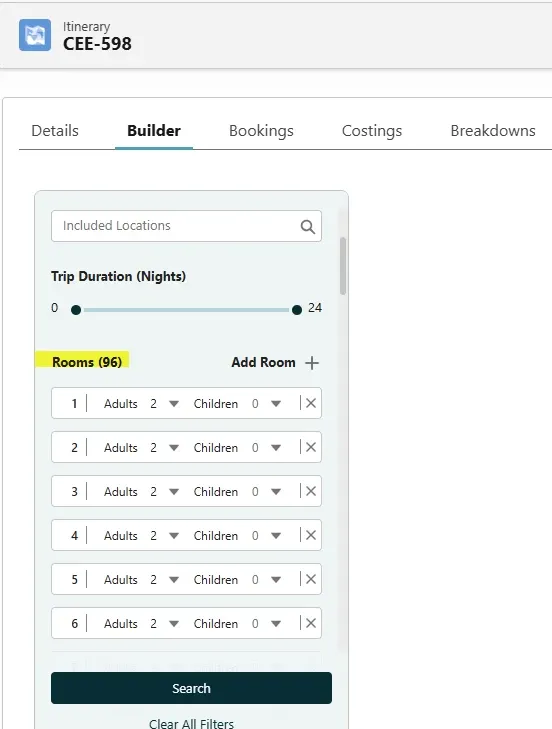
Users can now configure more than 20 rooms in the Package Search search panel, enabling support for larger and more complex booking scenarios.
Room handling has been improved to provide a clearer and more intuitive user experience:
-
Room numbering updates dynamically when rooms are added or removed.
-
Each room is displayed as a pill that clearly shows its room number/index.
-
The total number of rooms is now visible in the UI and displayed in brackets (X),
Improved Error Handling for Large Search Criteria
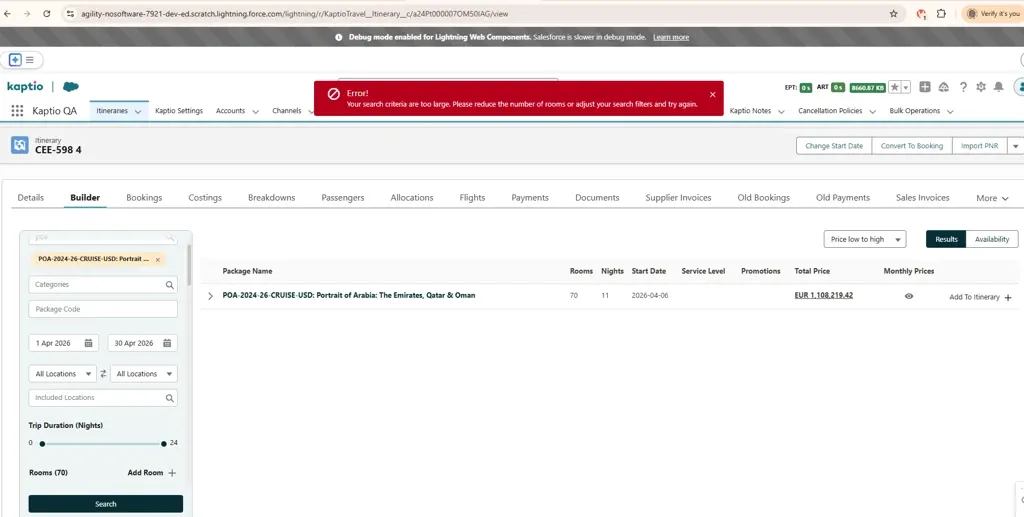
When a search exceeds system limits due to excessive criteria (for example, SOQL 101 – query too large), the application now displays a clear and user-friendly error message. This message informs users that their search criteria are too large and guides them to resolve the issue by reducing the number of rooms or adjusting search filters.
Error message shown:
Your search criteria are too large. Please reduce the number of rooms or adjust your search filters and try again.
Unable to convert 20x room itinerary to booking (ST-2629)
This release resolves an issue where converting large itineraries (e.g. multi-room Booking Wizard quotes) to bookings could fail with an “Aggregate query has too many rows” error, preventing successful conversion and causing downstream problems during payment finalisation. The booking conversion logic has been refactored to query itinerary items separately and process them safely at scale, avoiding aggregate query limits. As a result, large itineraries now convert reliably to bookings, and payments correctly generate transaction records and persist the booking state after page refresh.
Newly created itinerary redirects back to the Contact instead to the itinerary (ST-2639)
Fix redirection to Booking Overview after Booking Wizard is closed and itinerary is created
Lapsed itinerary shows an empty Booking overview (ST-2643)
Fix the issue that Booking Overview not showing Lapsed Passengers after the itinerary is lapsed
RightRez_PNR import failing when using payload with code 30002 and itinerary ID (ST-2665)
Added a comment explaining that it’s not an issue in RightRez scope.
RightRez_PNR imported twice (ST-2669)
We added the duplicate PNR import prevention mechanism for the RightRez webhook and the redirect page. We check if there already PNR records for the same locator and throw an error. Admin users can find that error in the Async Job logs for the webhook and users see it displayed on the page on redirect.
Cancellation of 4 rooms at once - Tour is doubled (ST-2679)
Fix an issue where in Change Occupancy mode for cancelled room in booking 4+ rooms some previous items would not get cancelled
Temporary Hold takes up units from existing rooms when a room is added (ST-2690)
Resolved an issue where adding a new room in Change Occupancy (CO) without modifying existing rooms caused Temporary Hold (TH) inventory to be applied to all rooms instead of only the newly added one. The occupancy availability check now correctly excludes unchanged rooms, ensuring inventory is held only for the room being added and preventing double allocation of Cruise, Tour, and MaxPax units.
Pre Stay & Post Stay Tabs, cannot book On Request room when other has AL status with Shared Inventory Contracts (ST-101)
For Pre & Post Hotels using shared inventory contracts (e.g. Single/Double/Triple drawing from the same room pool), availability is now updated consistently across all room selections. Previously, selecting a room for one occupancy reduced the available allotment only for the first room, while other rooms using the same inventory contract continued to display the original availability. This has been corrected so that availability is reduced across all related rooms, with appropriate fallback statuses (such as On Request) applied when allotment is exhausted, ensuring accurate availability and selection behavior in the Booking Wizard.
“Create Booking” in Booking Wizard incorrectly sets Booking__c = TRUE (ST-2126)
When creating a new itinerary via the Create Booking action in the Booking Wizard, the system no longer sets the Bookingc field to TRUE by default. Instead, Bookingc is now explicitly set to FALSE for newly created itineraries, aligning system behaviour with the expected business logic. This change has been applied consistently across both Booking and BookingV2 implementations to ensure predictable and correct booking state on itinerary creation.
Promotions_Transfer_promotions not visible on Cancelled Itinerary, PromotionIncludedIds remains linked (ST-2267)
This update improves the Booking Overview UI to clearly display promotions applied to itinerary items, including after itinerary transfers to a new departure date. Promotions linked via PromotionIncludedIds and PromotionEffect are now rendered directly beneath the relevant itinerary items in the Booking Overview, ensuring transparency when promotional pricing (e.g. Solo Savings or Water promotions) has reduced the component price. This addresses scenarios where promotional discounts were correctly applied to pricing but not visibly represented in the Back Office after transfer, helping users better understand price adjustments and promotion retention on transferred itineraries.
Promotions_issue when promo amount is changed after creating Itinerary (ST-2271)
Booking Overview now consistently uses the historical SELLPROMO price line value when available, ensuring promotion amounts match the values applied at booking time. If a SELLPROMO price line is not present, the system safely falls back to recalculating the promotion value from current configuration (e.g. percentage-based promotions).
Booking Wizard | Auto Select when no cabins in the cabin list (ST-2283)
Updated the Booking Wizard to correctly account for temporary held inventory when creating a new itinerary from Package Search. Cabin availability now reflects any existing temp holds in SEARCH mode, preventing overbooking and showing accurate availability. Additionally, fixed a potential JavaScript error in the cabin selection step when a room has no cabins returned, ensuring the Auto Assign button handles empty or undefined cabin lists safely. These changes improve both inventory accuracy and stability during cabin selection.
Parallel Testing - Creating Multiple Itineraries in Parallel with different tour codes - 7/10 were itineraries created (ST-2434)
Resolved an issue where creating itineraries in parallel could intermittently fail with a “Record Currently Unavailable” error due to row-locking contention during itinerary insert processing. The fix improves handling of concurrent access to shared configuration records, ensuring reliable itinerary creation under parallel load. Retesting with 10 simultaneous users successfully created all itineraries without errors, confirming improved stability for high-concurrency booking scenarios.
Cabin is visible as unavailable after error when cabin selection is changed (ST-2471)
Fixed an issue where rapidly clicking Change Cabin for multiple rooms could leave cabins in an inconsistent state, causing previously selected cabins to appear unavailable even though they were not reserved in inventory. The Booking Wizard now prevents cabin actions while a temporary hold update is in progress, ensuring cabin selections are processed sequentially and released correctly. This prevents cabins from becoming incorrectly blocked and ensures they can be reselected for the same or a different itinerary.
RightRez PNR Auto Refresh needs to up Kaptio Itinerary (ST-2472)
Added a capability to find itinerary by the PNR passenger reservation number in the RightRez auto-refresh webhook.
Correspondence Delivery screen not updating correctly in split per PAX scenario with passengers with similar name (ST-2487)
We’ve fixed an issue in the Booking Overview where passenger room assignments and inactive passenger lists could become inconsistent after changing occupancy and then cancelling a room or package. The Booking Wizard now correctly uses the updated occupancy configuration when cancelling rooms, ensuring passengers are reassigned as expected and that only truly cancelled passengers appear as inactive in the Overview. This resolves cases where swapped passengers caused incorrect room references or extra inactive passengers to be displayed.
Modify on non-refreshed itinerary visually cancels pax (ST-2503)
Addressed an issue for modify mode getting old passengers values if entering modify mode immediately after changing occupancy
Modify Package flow generates a new reservation number on cabin update (ST-2512)
The reservation number is now not regenerated when only cabin was changed without other room config changes
Waitlist - Land Tour - 10% of package price is considered for Tax in Expanded Result (ST-2513)
Resolved a calculation error in Land Tour waitlist expanded results where taxes were incorrectly computed as 10% of the package price, ensuring accurate display of Total and Per Person rates.
Change occupancy - Incorrect Maxpax count is displayed in package search availability ribbon (ST-2515)
This release fixes an issue in Change Occupancy where availability could be incorrectly shown when no existing rooms were selected. Availability calculations are now correctly scoped to the passengers and room allocations being modified, preventing sold-out departures from displaying available capacity. The update also improves handling of itinerary item filtering during occupancy changes and introduces a robust helper for safely resolving deep, namespaced object paths, improving reliability across Package Search and related UI logic.
When Passengers tab is disabled, Cancel Room is forcing Cabin selection (ST-2517)
Fixed an issue in Booking Wizard Change Occupancy where disabling the Passengers tab caused the flow to incorrectly default to the Cabins tab during room cancellation for Cruise packages. The wizard now lands on the correct view based on mode, ensures cabin selection is not forced when cancelling a room, and correctly shows the Confirm Cancel action without enabling or displaying the Cabins tab when it should be disabled.
Getting error “Attempt to de-reference a null object” while migrating JSON using Boomi process for M2K migration (ST-2527)
Added validation with a descriptive error message that clearly identifies:
-
The Component ID
-
The Price Category ID
-
The expected Service Level ID
-
Guidance to verify service level assignments
Example Error Message:
Component option not found for the selected service level. Component ID: [id], Price Category ID: [id], Service Level ID: [id]. Please verify that the optional component is assigned to the correct service level.
Though cabin category inventory is available the cabin rooms are not displayed in booking wizard (ST-2538)
The LapseItineraryService has been refactored to improve data consistency and inventory handling when lapsing itineraries. The process now performs atomic commits to update itinerary items, room assignments, passengers, rooms, and associated service cabins in a single transaction. Active itinerary items are set to inactive, allotments are cancelled, and service cabin passenger counts are recalculated before committing. Room assignments, passengers, and rooms are marked as lapsed in a deduplicated, transactional manner. These changes resolve issues where cabin inventory was not properly released for lapsed or cancelled itineraries, ensuring that available cabins are correctly displayed in the booking wizard.
Setting "Hide Cancelled passengers" not observed (ST-2543)
This release fixes an issue where cancelled passengers were still displayed in the Allocations tab even when the “Hide Cancelled Passengers” setting was enabled. The passenger selector logic has been corrected to properly respect the skipCancelledPassengers flag when querying passengers by itinerary, ensuring cancelled passengers are now correctly excluded from allocation views when the setting is turned on. This restores the expected behaviour and alignment with user configuration.
Cancelling Modify package works in the second attempt (ST-2547)
Fixed an issue in the Booking Wizard where cancelling changes in Modify mode did not immediately navigate back to the Booking Overview. Now, after confirming the cancellation, users are correctly redirected to the Booking Overview without needing to click Cancel a second time. This improvement ensures smoother navigation and prevents unnecessary repeated actions when exiting the wizard.
Package Search - Click on Back link text ending up with Page not exists error (ST-256)
Fixed an issue where clicking the Back link in Package Search could result in a “Page doesn’t exist” error when launched from a Contact record. The Back action now correctly resets state and reliably navigates the user back to the originating Contact record page.
Total Sell shows 0.00 instead of correct amount in PNR Ticket details - All Currencies (ST-2569)
TotalSell will be correctly populated. No config required.
Tauck Arrival and Departure Dates by Kaptio are not populated for the configured FC Dev package 'ZD-2027' which has departure in February 2026. (ST-2581)
We moved and optimized the logic from KaptioFlightsDepartureArrivalDates flow into Booking save apex process.
Passenger arrival and departure dates are now automatically calculated based on their itinerary items. The system identifies the earliest arrival date and latest departure date from all active itinerary items (excluding flights) assigned to each passenger. When multiple items share the same date, arrival and departure times are compared to determine the most accurate times. For package bookings without pre-stay or post-stay accommodations, the system uses the package departure date and length to calculate the departure date.
It is not possible to cancel a room and add a room or cancel a pax in one action in change occupancy mode (ST-2590)
Fixed an error with Temporary Hold inventory handling for flow where in single itinerary occupancy change session there is a cancelled and a new room.
An error in CO when entered after Modify package (ST-2591)
Improved the handling of cabin and component resets during Change Occupancy by making the selection reset flow asynchronous and ensuring cabin unassignment completes reliably before state updates. This reduces the risk of invalid Booking Wizard state during occupancy changes and improves overall stability when clearing or reassigning cabins.
'Check Waitlist' Error (ST-2609)
Fixed null pointer in the logging framework
Transfer package to water tour - Clicking add options showing a popup with error message 'Someone else just reserved the last inventory for this departure. Please choose another date to continue.' (ST-2616)
Fixed an issues where temporary hold items where not fetched during allotments recalculation.
Create itinerary with 1 double and 2 single[All the rooms Bedding Request - King or Queen] is throwing 'Something went wrong: Max Room Occupants limit is reached: Bedding Request - King or Queen' error (ST-2620)
Fixed logic in options grouping that incorrectly grouped same selection for different room causing “Max Room Occupants limit is reached” error
Ability to import Shell PNR from Rightrez (ST-2625)
When Send To GDS succeeds, we will send a notification to the user with PNR locator reference as well as create a PNR with IsShell equal to true. It will also be visible in Air Tickets LWC.
Once details are added in GDS, actual PNR can be imported and Shell can be cancelled in Air Tickets LWC component (it is there just for a temporary reference).
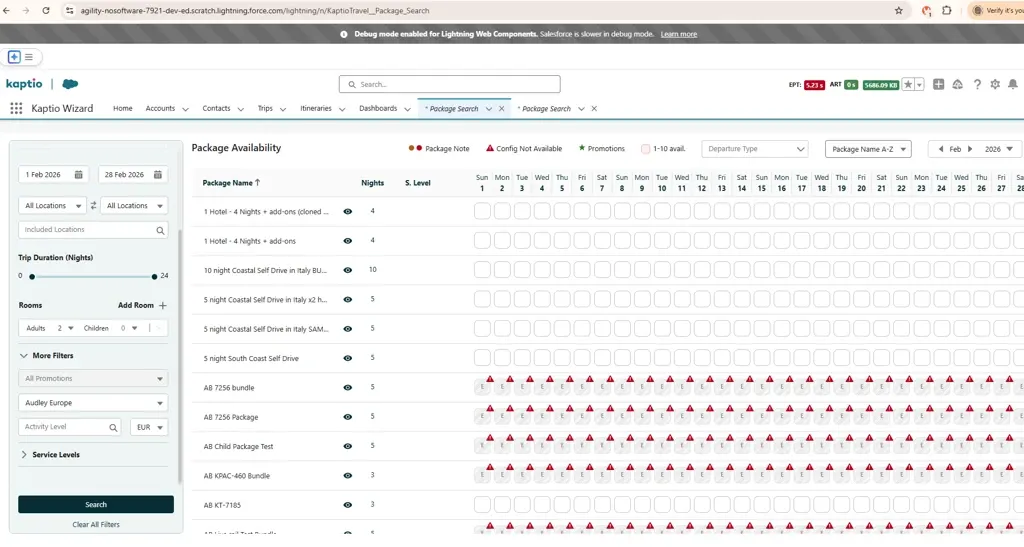
Honor AppSettings.DefaultTaxProfile for standalone Package Search (CEE-631)
DefaultTaxProfile field is now automatically populated when a standalone Package Search is opened in a single browser tab
Users can now perform Package Search directly from the Console. This enhancement enables a smoother and more efficient workflow by allowing users to search for and access packages from standalone package search application
Bug Fixes
Date Picker Selection Issue After Automatic Date Filter Update in Package Search (CEE-666)
Fixed an issue where selecting a date in the date picker failed after Package Search automatically updated the date filter to a month.
Improved Cancellation Modifier Assignment Logic (KT-13961)
Overview
Enhanced the bulk operations cancellation feature to properly apply configured cancellation modifier values. When processing bulk itinerary cancellations, the system now consistently uses the official modifier configuration instead of just the modifier name.
What Changed
The way the system determines which cancellation modifier value to apply has been improved. Previously, it would always use the modifier name provided as input. Now it intelligently checks for a configured definition and uses the official value from that definition.
How It Works (Simplified)
When setting a cancellation modifier on an itinerary, the system now supports two equally valid approaches:
Running Bulk Operation Manually:
-
You specify a cancellation modifier name (e.g., "TEST_MODIFIER")
-
The system looks up the official configuration for that modifier
-
It applies the configured value (e.g., "ACTUAL_VALUE") instead of just the name
-
This ensures consistency across all cancellations using that modifier
-
Recommended for most bulk operations with predefined modifiers
Running Bulk Operation from a scheduled job (auto transition):
-
You need to apply a custom value that bypasses the standard configuration
-
You can set an override flag to use your specified value directly
-
This is a valid, important approach for operations that have their own modifier requirements
-
Examples: Package pricing transitions and other specialized bulk operations
Business Benefits
-
Consistency: Operations using standard configurations will have the same values applied consistently
-
Flexibility: Both predefined configurations and custom values are fully supported
-
Reliability: Prevents accidental misuse of modifiers by enforcing validated definitions
-
Control: Clear distinction between standard flows and specialized operations
Only Itinerary items with Mode = Active should be visible in Bulk Manager for packages (KT-13962)
Improved Bulk Manager Table Refresh and Item Filtering
The Bulk Manager table now properly refreshes when you click the Refresh button, ensuring you see the latest data, including any changes to item status.
Previously, the table would not update to reflect changes made to itinerary items.
Additionally, the table now displays only active itinerary items by default, providing a clearer view of items currently in use. Inactive items are filtered out to reduce clutter and focus on relevant data for your operations.
These improvements enhance data accuracy and provide a more reliable user experience when managing bulk operations.
Bulk Manager: Itinerary Status shown is showing API name instead of label (KT-13963)
Itinerary Status Now Displays User-Friendly Labels
The Bulk Manager table now displays itinerary status using clear, user-friendly labels (such as "Completed" or "Active") instead of internal system codes. This makes it easier to understand the status of your itineraries at a glance and improves the overall readability of the table.
The status mapping is automatically maintained and always shows the correct label for your configured status values, ensuring consistency across your operations.
Bulk Manager: Use Confirmation Actions for Component Replacement(KT-13968)
Problem/Background
When using the "Replace Component Options" feature in Bulk Manager, the system allowed users to set a "Confirmation Status" directly. This approach can bypass the standard logic where "Confirmation Actions" (such as "Confirm" or "Cancel Manually") are used to trigger status transitions and related workflows. Direct status updates could lead to inconsistencies in itinerary item states and did not align with the standard behavior used elsewhere in the application.
Solution
The "Replace Component Options" modal has been updated to use Confirmation Actions instead of direct Status fields.
-
UI Update: The dropdowns for "Replaced Service" and "Inserted Service" now display Confirmation Action options (e.g.,
Confirm,Unconfirm,Cancel Manually). -
Backend Logic: The replacement operation now applies the selected ConfirmationAction__c to the respective itinerary items.
-
Safety Checks: Enhanced logic in the replacement service ensures that items marked for manual cancellation or specific actions are handled correctly during the finalization process.
Impact
-
Operational Consistency: Ensures that bulk replacements trigger the same status transition logic as manual edits on the itinerary.
-
Data Integrity: Prevents invalid status combinations by relying on the defined Confirmation Actions.
Video after fix:
Recalculating via Bulk Operations doesn’t work (KT-13977)
Summary
Fixed execution order of bulk operations to ensure pricing calculations and inventory checks complete before allotment actions are applied.
What Changed
-
Improved Bulk Operation Processing: When performing bulk operations that involve pricing recalculation and inventory management, the system now ensures that all pricing recalculations and validation checks complete before applying allotment actions. This prevents potential data consistency issues and ensures accurate inventory tracking.
Impact
-
More Reliable Bulk Operations: Recalculate Itinerary Items and Priced Package Switch operations now execute in the correct order, improving data integrity
-
Better Inventory Management: Allotment actions are now properly applied after all pricing and inventory validation is complete
Affected Features
-
Recalculate Itinerary Items bulk operation
-
Priced Package Switch bulk operation
Technical Details (for reference)
-
Callout operations (pricing recalculation, cancellation rules, payment schedules) now complete before any database modifications
-
Enhanced test coverage with new validation tests for allotment action scenarios
Inventory Setup ID Not Set on Replace Itinerary Item Operation (KT-14017)
Problem: When replacing itinerary items through bulk operations, the InventorySetupId__c field was not being properly populated on newly created itinerary items. This resulted in inventory status issues where new items could incorrectly have a "Live Inventory" status (ID: 2).
Solution:
-
ItineraryItemOperationShared.cls
-
Added itemSetupId and itemSetupName population from priceCategory.Item__r fields
-
-
PriceCategoriesSelector.cls
-
Added Item__r.InventorySetupId__c to the selector query
-
-
ReplaceItineraryItemService.cls
-
Removed duplicate wrapper method to use shared implementation directly
-
-
ReplaceItineraryItemServiceTestSuite.cls
-
Enhanced test data with inventory setup fields (InventorySetupId__c = '3', InventorySetupName__c = 'Advanced')
-
Added assertions to verify InventoryStatusId__c is properly set and not defaulting to Live Inventory status
-
Impact:
-
Ensures replaced itinerary items correctly inherit inventory setup configuration
-
Prevents incorrect inventory status assignment on bulk replace operations
-
Improves data consistency in inventory management